
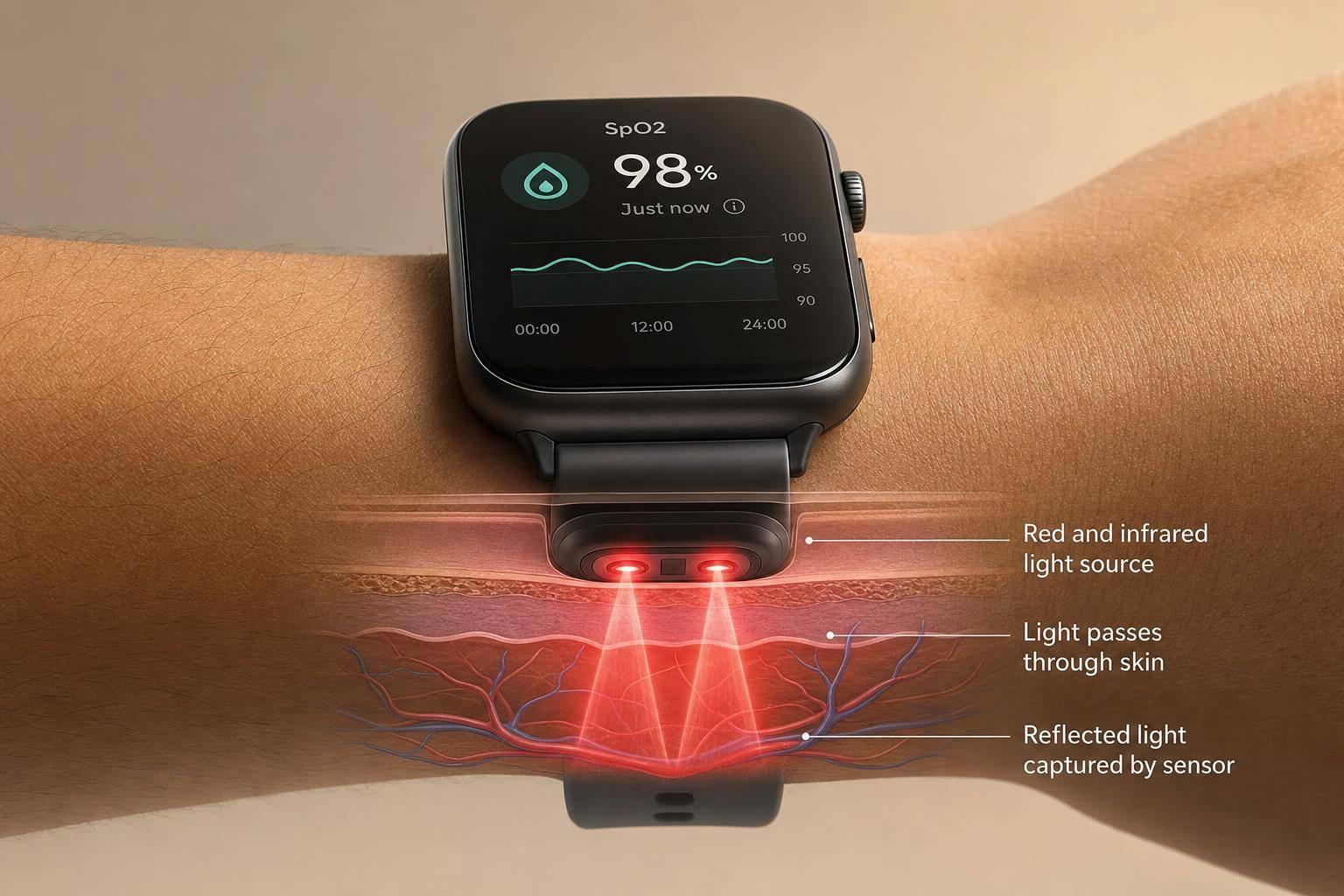
Your smartwatch does not measure oxygen directly. It shines red and infrared light into your wrist, reads the reflected light, and estimates your SpO2. For most healthy adults at rest, SpO2 is usually 95% to 100%, while below 90% is low. The key point: I’d use smartwatch oxygen data for trends, not one-off readings or medical decisions.
Here’s the short version:
- How it works: wrist sensors use PPG and reflectance oximetry
- What affects readings: motion, loose fit, cold skin, bright light, tattoos, and lower blood flow
- What the numbers mean: day-to-day swings of 1–3 points can be normal
- Best use: sleep tracking and checking your baseline over 7–14 days
- When to take it seriously: symptoms matter more than the number on the screen
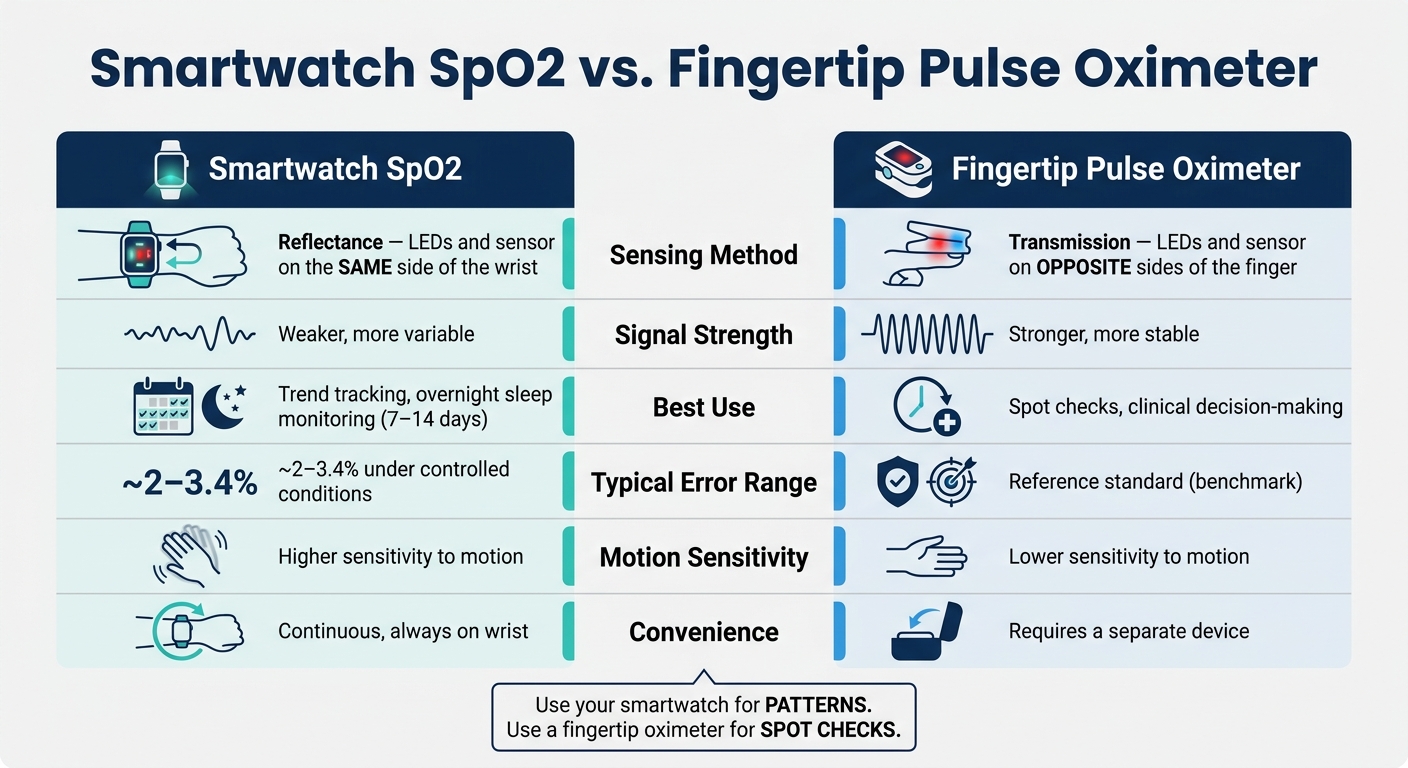
I’d think about it like this: a smartwatch is good at showing patterns, while a fingertip pulse oximeter is better for spot checks. Wrist readings are more likely to drift because light has to bounce through thicker tissue and around bone.
If I wanted better readings, I’d do four things:
- Wear the watch one finger-width above the wrist bone
- Keep the band snug and the sensor flat on the skin
- Sit still for 2–3 minutes before a reading
- Retest after 3–5 minutes if a number looks off
A low reading with shortness of breath, chest pain, confusion, trouble speaking, or bluish lips is not something I’d ignore. In that case, the symptoms matter more than the watch.
This guide breaks down the sensor basics, how smartwatch SpO2 differs from fingertip devices, what can throw readings off, and how I’d use the data in day-to-day life without overreacting to every small change.
Can Your Smartwatch Read Blood Oxygen?
Modern devices use AI in wearables for real-time health adjustments to ensure these readings remain accurate during movement.
sbb-itb-f5765c6
How oxygen monitoring works in smartwatches
Smartwatch SpO2 vs. Fingertip Pulse Oximeter: Key Differences
Smartwatches estimate SpO2 with photoplethysmography (PPG). In plain English, PPG looks at changes in reflected light to estimate blood oxygen. Blood absorbs light differently based on how much oxygen it’s carrying, so the watch reads those shifts and turns them into an SpO2 estimate. That’s also why fit, stillness, and solid skin contact matter so much.
The sensors on the back of the watch
Turn your smartwatch over and you’ll see a small group of lights and sensors pressed against your wrist. That group usually includes red LEDs, infrared LEDs, and photodiodes that pick up the light reflected back from your tissue. [10][11][12]
This setup is called reflectance oximetry. The light source and detector are on the same side of the wrist. That design makes wrist-based tracking possible and comfortable, but there’s a catch: the signal is weaker than what you get from a fingertip device, where light passes straight through the tissue. [6][7]
How the watch converts light signals into an SpO2 reading
Here’s what happens when your watch starts an SpO2 reading.
The red and infrared LEDs turn on and send light into the blood-rich tissue in your wrist. Oxygenated hemoglobin absorbs more infrared light and less red light, while deoxygenated hemoglobin does the reverse, absorbing more red and less infrared. [10][1][11]
The photodiodes then collect the reflected light and turn it into a raw signal. From there, the software filters out background light and motion noise, compares changes in the red and infrared pulse signals, and converts that ratio into an SpO2 estimate using calibration data from human studies. [10][11][12] A reading usually takes 10–30 seconds. [5][8][9]
Smartwatch SpO2 vs. fingertip pulse oximeter
The physics are the same in both devices, but the setup is different. A fingertip pulse oximeter uses transmission oximetry, with LEDs on one side of your finger and a detector on the other. That means the light passes through your finger. The path is short and clean, which helps produce a stronger, steadier signal. [6][7]
At the wrist, light has to bounce back through thicker tissue and around bone. That makes the signal noisier and harder to read with the same precision, especially when you’re moving. That’s the trade-off for having SpO2 tracking on your wrist all day and night.
| Aspect | Smartwatch SpO2 | Fingertip Pulse Oximeter |
|---|---|---|
| Sensing method | Reflectance (LEDs and sensor on same side) | Transmission (LEDs and sensor on opposite sides) |
| Signal strength | Weaker, more variable | Stronger, more stable |
| Best use | Trend tracking, overnight sleep monitoring , which can be enhanced by AI-driven health nudges | Spot checks, clinical decision-making |
| Typical error in controlled testing | ~2–3.4% under controlled conditions [13][14][8] | Generally used as the reference standard |
| Motion sensitivity | Higher | Lower |
| Convenience | Continuous, always on wrist | Requires a separate device |
Because wrist readings are more sensitive to fit and motion, setup matters.
How to set up your watch and get a better reading
Prepare your watch, wrist, and surroundings
Good fit makes a big difference in signal quality. Wear the watch about a finger-width above your wrist bone, closer to the elbow, so the back sensor sits on soft tissue instead of bone. Tighten the band so it stays in place without digging into your skin, and make sure the back sits flush against your skin with no gaps.
The skin under the watch should be clean and dry. Skip lotion, sunscreen, or insect repellent under the sensor, since they can weaken the signal. If your wrist feels cold from being outside or sitting in air conditioning, warm it up before you measure. Cold skin can reduce blood flow near the surface, which makes the reading harder to pick up.
How to take a spot reading, step by step
Once the fit is right, take the reading while you're still and relaxed.
- Sit still for 2–3 minutes before you start.
- Open the Blood Oxygen or SpO2 app on your watch.
- Rest your forearm at heart level, palm down.
- Stay still and silent during the full reading, which usually takes 15–30 seconds.
- Treat the result as one data point. A single reading matters less than the trend over time. Tracking these metrics is easier when you create a personal health dashboard to centralize your data.
How to turn on background and sleep oxygen tracking
After spot checks, turn on overnight tracking so you can look at patterns while you sleep. In the companion app, look for settings such as "Sleep Blood Oxygen", "Pulse Ox During Sleep," or "Background SpO2 Measurements" and switch them on.
Once enabled, the watch measures your oxygen levels during sleep and shows the results as personalized health insights and trends you can check in the morning. For steadier data, wear the watch on your non-dominant wrist and use the same snug fit you use for spot checks.
How to read your SpO2 results and what affects accuracy
Now that you know how the watch comes up with an estimate, the next step is figuring out when that number is worth trusting.
What the numbers can and cannot tell you
With a smartwatch, small changes of 1–3 points are usually normal. Focus on the trend, not one reading.[20]
What matters much more than any single number is the pattern over days and weeks. If your resting or overnight SpO2 slowly moves from mostly 97–98% to mostly 92–93%, that shift deserves attention, even if no single reading looks dramatic on its own.
So treat smartwatch SpO2 as a trend signal, not a diagnosis.[19][21]
Common reasons for inaccurate or missing readings
A few everyday things can throw off a reading or stop it from showing up at all. Since the watch uses light through your wrist, anything that blocks that light or cuts down blood flow can distort the result. Understanding these behavioral patterns from wearables is key to interpreting your data correctly.
Motion is the biggest problem. Even small arm movements during a reading can add noise the sensor can't sort out well. A loose fit makes that worse. If the watch moves around, light scatters instead of passing cleanly through your skin.
Cold skin or poor circulation can also cause trouble because they reduce blood flow near the surface of the wrist. And in bright outdoor light, sunlight can slip under the watch and push readings off by a few points.[23]
Tattoos and darker skin can absorb or scatter more light, which may reduce wrist-sensor accuracy.[2][15][22] In good conditions, wrist readings are often within a few points of a fingertip oximeter, but accuracy gets worse at lower oxygen levels.[5][15]
What to do when a reading looks unusually low
If a number looks far outside your normal range, rule out common artifacts first.
Check for artifact first. If you have severe shortness of breath, chest pain, or bluish lips, seek emergency care immediately regardless of what the watch shows. If you feel fine, the reading is probably an artifact.
| Issue | Likely Cause | What to Try |
|---|---|---|
| Lower than usual | Loose fit or poor skin contact | Tighten the band one notch; reposition a finger-width above the wrist bone |
| Watch fails to complete a reading | Motion or cold skin | Sit still, relax your hand, warm your wrist before retrying |
| Jumping numbers | Bright ambient light | Shade the sensor with your other hand or move indoors |
| Consistently low overnight values | Band loosening during sleep | Tighten slightly before bed; check if readings stabilize the next night |
| Low reading with tattoo on wrist | Ink absorbing sensor light | Move the watch to the other wrist or above the tattooed area |
After you make those adjustments, wait 3–5 minutes and take another reading. If the second number returns to your usual range, the first one was almost certainly an artifact.
If readings stay low while you're at rest - especially if they keep landing in the low 90s or below - bring your trend data and any fingertip oximeter readings to your next appointment.[16][17][18]
How to use oxygen data in your everyday health routine
Once you understand what your watch can and can’t measure, use it to track your baseline rather than reacting to every small swing.
Build a simple routine around consistent measurements
SpO2 works best when you check it the same way each time. For most healthy adults, a reading in the morning and another in the evening is enough. Try to use the same timing and conditions each day so your numbers are easier to compare.
It also helps to turn on sleep oxygen tracking. Repeated dips overnight can point to a pattern worth paying attention to. Focus on 7–14 day trends, not one-off daily readings. Using AI-driven health apps can help automate this trend analysis by integrating wearable data into personalized wellness plans. A steady change from your usual baseline means more than a single odd number.
If your baseline shifts for several days, take that as a sign to look more closely.
When to stop relying on the watch and see a doctor
If the trend stays low, stop treating the watch like a general wellness check and get medical advice.
If you have shortness of breath at rest, chest pain, sudden confusion, difficulty speaking, or bluish lips, seek immediate medical attention regardless of what your watch shows.[24][25][26] Symptoms always matter more than the number on the screen.
For non-emergency situations, if your resting SpO2 stays below 95% across multiple readings over several days - especially if you also feel more tired or more short of breath than usual - bring that trend data to your doctor.[3][4][27]
FAQs
How accurate is smartwatch SpO2?
Smartwatch SpO2 monitoring can give you a helpful view of your health in real time, but it isn't accurate enough to diagnose medical issues.
Where it shines is pattern spotting. For example, it can help you notice repeat oxygen dips during sleep. That kind of trend can be useful, especially when you look at it over days or weeks instead of treating a single reading like a medical answer.
That said, accuracy can shift over time. Everyday wear, fit, movement, and environmental conditions can all affect the numbers you see.
Healify adds more context by looking at wearable data alongside other health metrics, which helps turn raw readings into more personal wellness insights.
Why does my watch show low oxygen sometimes?
Your watch may show low blood oxygen (SpO₂) for a few different reasons. Sometimes it’s the sensor. Sometimes it’s the way the watch sits on your wrist. And sometimes it reflects an actual change in your body.
Readings can shift because of motion, cold weather, skin contact, or a loose fit. In short, watch-based SpO₂ numbers aren’t perfect, and small drops don’t always mean something is wrong.
That said, frequent dips, especially during sleep, can at times point to breathing interruptions or conditions like sleep apnea. Healify can help you compare those changes against your personal baseline, which makes it easier to spot patterns instead of focusing on one-off readings.
If the drops keep happening or you’re worried about what you’re seeing, talk with a medical professional.
When should I worry about a low reading?
A low reading matters when it moves away from your usual baseline or sets off an urgent health alert from your monitoring system.
Tools like Healify track your health patterns over time and help spot changes that fall outside your normal range. If your device shows a sudden drop in oxygen levels or flags other unusual biometric signals, take that alert seriously and pay attention right away.