
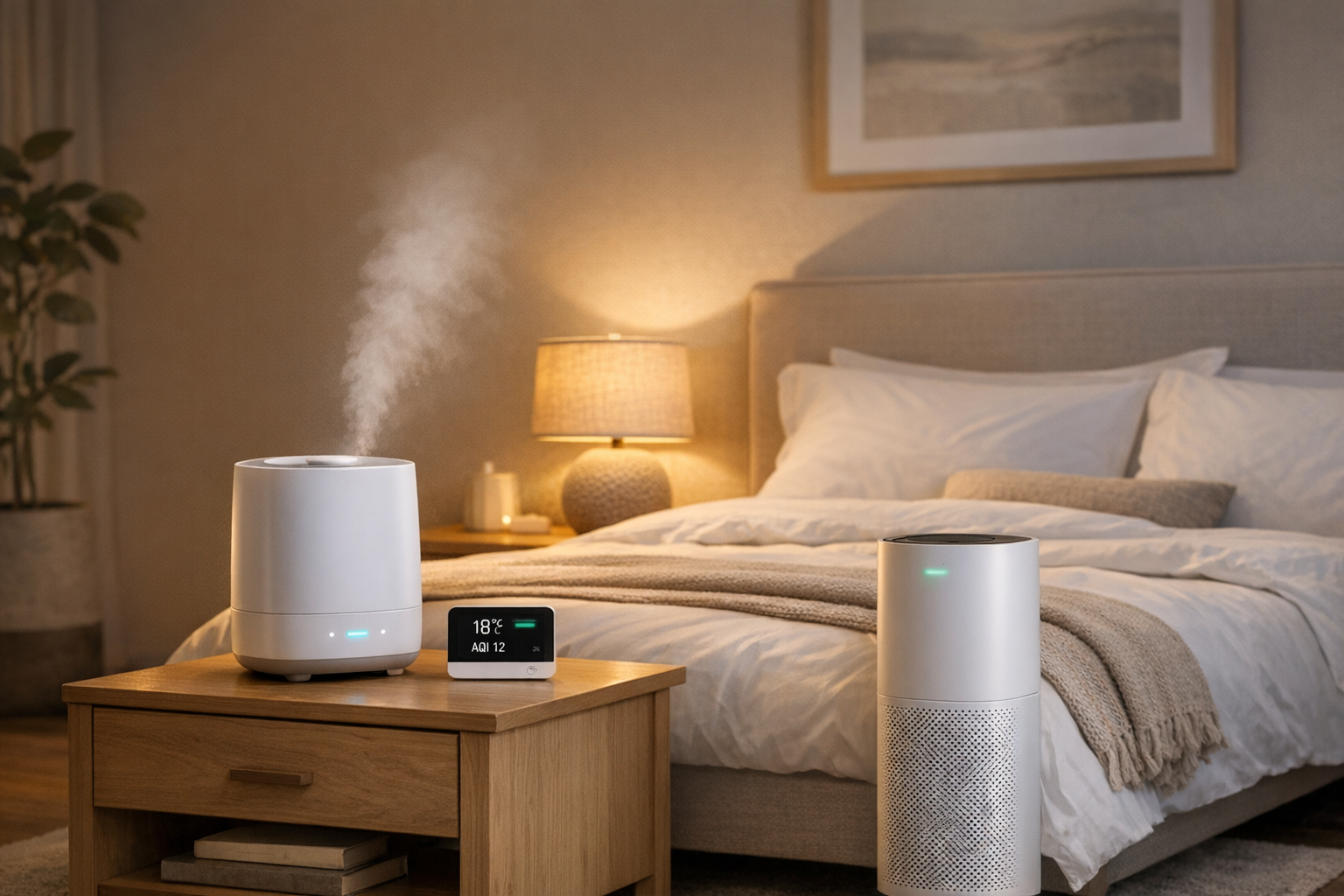
Want better sleep? Start with cleaner air. Poor air quality in your bedroom can disrupt your rest, leading to issues like congestion, snoring, or even reduced sleep efficiency. Factors like CO₂ levels, temperature, humidity, and airborne pollutants all play a role in how well you sleep. Here's how you can create a smarter, healthier sleep environment:
- Monitor key factors: Use air quality monitors to track CO₂, PM2.5, VOCs, temperature, and humidity, or centralize your data using custom health dashboards.
- Optimize air quality: Use HEPA air purifiers, activated carbon filters, and proper ventilation to reduce irritants.
- Control temperature and humidity: Keep your bedroom between 60–67°F and maintain humidity around 45%.
- Automate your setup: Smart devices like purifiers, humidifiers, and thermostats can adjust conditions in real-time.
- Maintain your devices: Regularly clean filters, sensors, and keep firmware updated for accurate performance.
Can a HEPA Air Purifier Help You Sleep Better? | SleepScore Labs x PuroAir Report
Air Quality Factors That Impact Sleep
Optimal Bedroom Air Quality Ranges for Better Sleep
The quality of the air in your bedroom can significantly affect how well you sleep. Let’s break down some key factors that play a role:
Temperature and Humidity
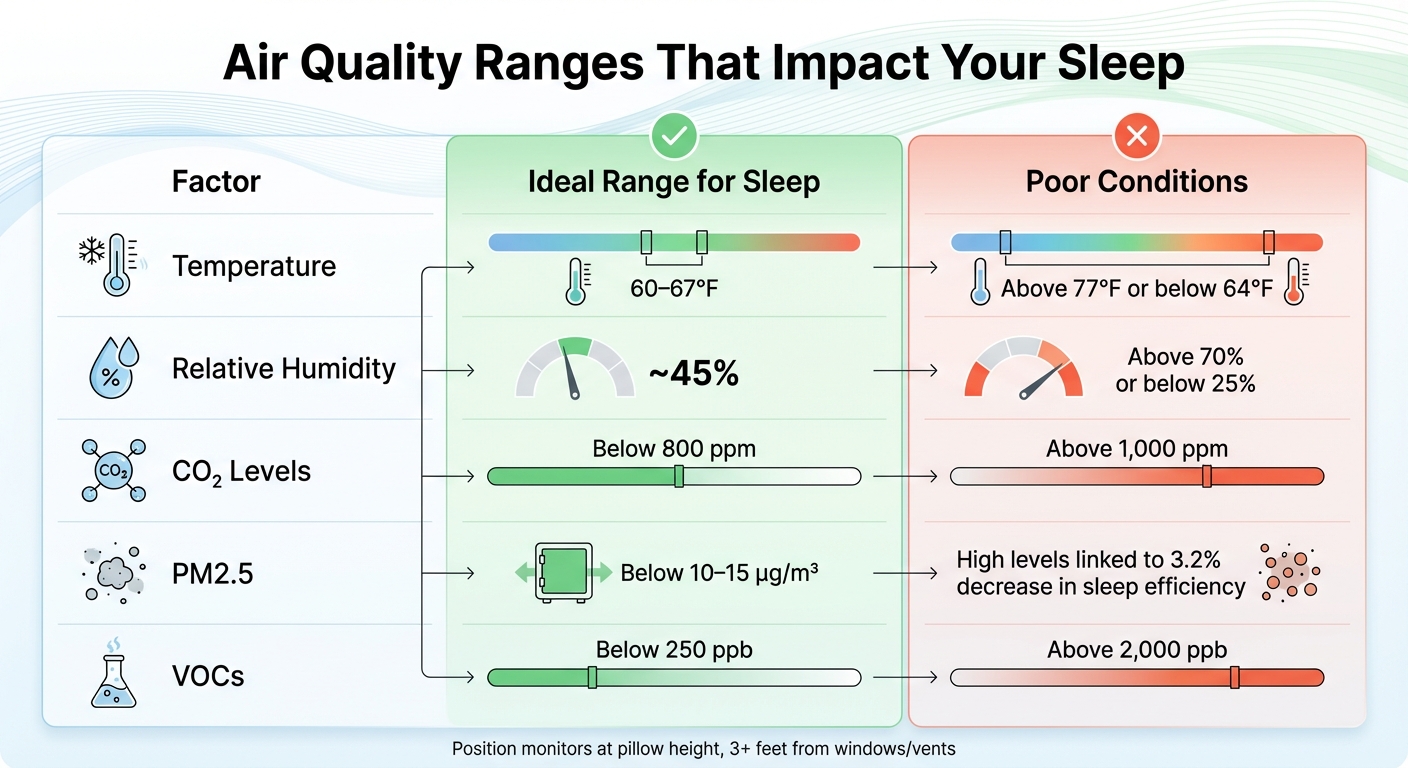
Your body naturally cools down as it prepares for sleep, which is why experts suggest keeping your bedroom at a comfortable 60–67°F. Temperatures outside this range - above 77°F or below 64°F - can disrupt your sleep patterns[7][1]. Humidity also matters; aim for a relative humidity of around 45%. If it dips below 25%, your airways might feel dry and irritated. On the flip side, humidity above 70% can make the air feel heavy and stuffy[1][7].
To monitor these conditions, place a sensor at pillow height, keeping it at least three feet away from windows, doors, or vents. Use a humidifier or dehumidifier to adjust the humidity until it feels just right.
| Factor | Ideal Range for Sleep | Poor Conditions |
|---|---|---|
| Temperature | 60–67°F[7] | Above 77°F or below 64°F[1] |
| Relative Humidity | ~45%[7] | Above 70% or below 25%[1] |
| CO₂ Levels | Below 800 ppm[1] | Above 1,000 ppm[1] |
CO₂ Levels and Ventilation
Ventilation is another critical element for good air quality. As you breathe in a closed room, carbon dioxide (CO₂) levels naturally rise. When CO₂ exceeds 1,000 ppm, the air becomes stale, making it harder to breathe and potentially reducing sleep quality. A study published in Sleep Health in April 2023 highlights that high CO₂ levels can lower sleep efficiency[6].
To improve ventilation, open a window for a few minutes each week to let fresh air circulate[1]. If outdoor air isn’t ideal, use your HVAC system’s ventilation mode or an exhaust fan instead[4]. Some smart thermostats, like the Ecobee Smart Thermostat Premium, can even estimate CO₂ levels and automatically activate ventilation when needed[4]. Just make sure your air quality monitor is placed away from direct airflow to get an accurate reading of the room’s conditions[1].
Particulate Matter and VOCs
Airborne pollutants like particulate matter (PM) and volatile organic compounds (VOCs) can also interfere with your sleep. Particulate matter includes things like dust, pet dander, and smoke. PM2.5 - tiny particles smaller than 2.5 micrometers - is particularly problematic because it can deeply penetrate your lungs. High levels of PM2.5 have been linked to a 3.2% decrease in sleep efficiency[6].
VOCs, on the other hand, are chemicals released by everyday items like furniture, cleaning products, and candles. Ideally, VOC levels should stay below 250 ppb, as levels above 2,000 ppb are considered poor[1]. Both PM2.5 and VOCs can irritate your airways, leading to coughing, congestion, and restless nights[3][4].
To combat these pollutants, use HEPA and activated carbon filters at breathing height. Running these filters continuously can help keep PM2.5 and VOC levels in check[1][2][3].
Allergens and Airborne Irritants
Common allergens like dust mites, pet dander, pollen, and mold spores can wreak havoc on your sleep if you’re sensitive to them[3][9]. These allergens often lead to nasal congestion, sneezing, and throat irritation, which can fragment your sleep and leave you feeling drained during the day.
To minimize allergens, take a few simple steps:
- Wash your bedding weekly in hot water.
- Vacuum regularly using a vacuum with a HEPA filter.
- Keep pets out of the bedroom.
- Close windows during high-pollen seasons and rely on filtered HVAC air[9][2][5].
Monitoring your indoor PM2.5 levels can also help you decide when additional air filtration might be necessary[1].
For an even more tailored approach, consider integrating air quality data with health metrics using platforms like BondMCP to fine-tune your sleeping environment.
Selecting Smart Air Quality Devices
Creating the perfect sleep environment often starts with monitoring and controlling the air quality in your bedroom. The smart home market offers a variety of tools, from all-in-one monitors to specialized purifiers and humidity controllers. Here's a closer look at what to consider when choosing these devices.
Smart Air Quality Monitors
Air quality monitors are essential for understanding the conditions in your bedroom. Look for models that track key metrics like CO₂, PM2.5, PM10, VOCs, temperature, and humidity. For accurate CO₂ readings, opt for monitors equipped with NDIR sensors, which are known for their precision and durability.
Connectivity is another critical feature. Choose monitors that support Wi-Fi or Bluetooth and integrate seamlessly with platforms like Apple Home, Amazon Alexa, Google Home, or IFTTT. Devices compatible with Matter 1.2 offer added versatility by enabling standardized triggers between brands. For instance, you can set your air purifier to automatically activate when PM2.5 levels rise.
If you're placing the monitor in your bedroom, consider one with a dimmable or E-ink display, such as the Aranet4 HOME, to avoid disrupting your sleep. Position the monitor on your nightstand at pillow height, keeping it at least 3 feet away from windows or vents for the most accurate readings.
| Device | Sensors | Display Type | Power | Price |
|---|---|---|---|---|
| Qingping Lite | CO₂, PM2.5, PM10, Temp, Humidity | LCD | USB-C | $76 |
| Aranet4 HOME | CO₂, Temp, Humidity, Pressure | E-ink (Always On) | 2 AA Batteries (up to 7 years) | $169 |
| Airthings View Plus | CO₂, PM2.5, VOC, Radon, Temp, Humidity | Color LCD | 6 AA Batteries | $299 |
Once you've established reliable monitoring, it's time to focus on devices that actively improve the air you breathe.
Smart Air Purifiers and Filters
Air purifiers with True HEPA and activated carbon filters are excellent for removing particulates and VOCs that can disrupt sleep. True HEPA filters are particularly effective, capturing 99.97% of particles as small as 0.3 microns. Research even shows that using a purifier can help healthy adults sleep about 12 minutes longer each night by reducing airborne irritants.
When selecting a purifier, match its CADR (Clean Air Delivery Rate) to your room size. For example, a 300-square-foot room typically requires a CADR of at least 195, while a 500-square-foot space may need 325 or more. Smart purifiers with auto-adjusting fan speeds and companion apps can maintain optimal air quality effortlessly.
"When picking an air purifier to use in your bedroom, the amount of noise it produces is an important consideration when choosing the right model."
– Dr. Dustin Cotliar, Sleep Physician
Avoid ionic or UV-based purifiers, as they can produce ozone, which is harmful to your lungs. For best results, position your purifier near your bed, leaving a few feet of clearance on all sides to create a clean air zone. Be diligent about replacing HEPA and carbon filters every six to twelve months, and clean washable pre-filters every 10 days.
Humidity Control Devices
Humidity controllers are a great addition to your setup, helping to maintain moisture levels that support comfortable breathing. Aim for a humidity level around 45%, as anything above 50% can encourage mold and bacteria growth. Smart humidifiers with built-in humidistats can automatically adjust to your target settings.
There are two main types of humidifiers to consider:
- Ultrasonic models: These, like the Levoit OasisMist 450S, can raise humidity levels quickly (up to 14% in 10 minutes). However, they may consume more power, especially in warm mist mode.
- Evaporative models: Devices like the Blueair H35i are energy-efficient, using as little as 6 watts, and they avoid the "white dust" that ultrasonic models sometimes leave when tap water is used.
For a quiet bedroom environment, choose humidifiers with sleep modes rated under 40 dB, such as the Levoit Classic 300S or the Raydrop Cool Mist. Many advanced models also offer app connectivity, allowing you to set schedules, receive alerts, and even use "Biorhythm" modes to adjust settings throughout the night. Pairing your humidifier with a smart hygrometer, like the Govee H5051, can help ensure accuracy over time.
HVAC Systems and Thermostats
Your home's HVAC system plays a key role in maintaining a consistent and comfortable sleep environment. Smart thermostats, such as the Ecobee Smart Thermostat Premium, can monitor indoor air conditions and adjust ventilation automatically when needed - especially useful if opening windows isn't an option due to outdoor noise or pollution.
Look for thermostats that support scheduling and geofencing, so your bedroom reaches the ideal temperature before you hit the sheets. Some advanced models even integrate with air quality monitors, allowing for real-time adjustments to both temperature and ventilation. Platforms like BondMCP can combine air quality data with sleep metrics for a more tailored experience.
Don't forget to upgrade your HVAC filters. Use the highest-rated MERV filters that your system can handle to capture more particles and improve air quality throughout your home. Be sure to replace them regularly, following the manufacturer's guidelines.
sbb-itb-f5765c6
Configuring and Automating Your System
Once you've chosen your devices, the next step is setting them up and automating their functions. This is where your smart sleep ecosystem truly comes to life, creating a responsive environment that adapts to your needs throughout the night.
Installing and Calibrating Devices
Getting accurate readings from your air quality monitor starts with proper placement. Position the monitor at breathing height, keeping it at least 3 feet away from windows, doors, or vents to avoid drafts interfering with the data. Make sure the device's vents are unobstructed and avoid placing it directly in the path of airflow.
VOC sensors need time to stabilize - typically 24–48 hours, though some, like Airthings models, may require up to 7 days. During this period, readings may fluctuate as the sensor establishes its baseline. To keep the monitor accurate, expose it to fresh air by opening a window at least once a week, and avoid moving it between rooms, as this resets its calibration.
For air purifiers, location matters too. Place them where air can circulate freely, ensuring there’s ample clearance on all sides. Choosing a purifier with a Clean Air Delivery Rate (CADR) higher than your room's size ensures it can run quietly while maintaining its effectiveness.
Once your devices are properly placed and calibrated, you’re ready to set up automations to maintain an ideal sleep environment.
Creating Basic Automations
Simple automations can make a big difference in maintaining a healthy sleep setting. For instance, program your air purifier to increase its speed if PM2.5 levels exceed 10–15 µg/m³ after 8:00 PM, and have it return to a quieter setting once levels drop. This way, you get cleaner air without constant manual adjustments.
For humidity, set your humidifier to maintain around 45% during the night. If your smart thermostat tracks VOCs or CO₂, you can configure it to increase ventilation when these levels rise or send you reminders to open a window for fresh air.
Connecting to Home Automation Platforms
Bringing all your devices onto a single platform simplifies their communication and coordination. Thanks to the Matter 1.2 standard, connecting smart air purifiers and air quality monitors from different brands is now much easier. Whether you use Apple Home, Google Home, or Amazon Alexa, these platforms allow you to create unified automations.
If you're using Bluetooth-only monitors like the Airthings Wave series, you'll need a hub - such as the Airthings Hub or a View series monitor - for remote access and third-party integrations. Once connected, you can set up complex automations. For example, if your monitor detects high CO₂ levels at night, it could signal your smart thermostat to increase ventilation and adjust your purifier - all without disturbing your sleep.
Tracking and Adjusting Your System
Keeping tabs on your data and maintaining your devices is key to ensuring your smart sleep setup continues to work seamlessly.
Reading Data Trends
Your air quality monitor is always collecting data, but the real value lies in spotting patterns over time. Most apps let you check historical trends across various periods - like 3 hours, 24 hours, a week, a month, or even a year. For instance, reviewing the 24-hour average can help you pinpoint dips caused by evening activities or the effects of closed doors [1].
CO₂ buildup is a common issue overnight, especially with modern ventilation systems that recycle indoor air to save energy instead of pulling in fresh outdoor air [8]. If your monitor shows CO₂ levels regularly exceeding 800 ppm, it’s a sign that your room could use better ventilation. On the other hand, if VOC levels rise in the evening, cracking a window or running an exhaust fan for a few minutes can help bring in fresh air [1][4].
But here’s something to keep in mind: nighttime outdoor air quality isn’t always better. Without sunlight to break down pollutants and with cooler ground temperatures keeping toxins closer to the ground, outdoor air might carry more pollutants at night [5]. If you notice poor sleep quality on nights when specific pollutants spike, tweak your automations. For example, you could program your purifier to run at a higher speed when PM2.5 levels exceed 10–15 µg/m³ after 8:00 PM [4].
Use these insights to fine-tune your system and schedule maintenance when needed.
Device Maintenance
Regular maintenance keeps your devices running smoothly and ensures accurate readings. Clean your monitors with a dry cloth every few weeks to prevent dust from blocking sensors [1]. When cleaning your room, use a damp cloth instead of a duster - dusting can stir up particles, causing temporary spikes in your monitor’s readings [5].
Filter upkeep is just as important. According to Dr. Faisal Zahiruddin, a sleep specialist and pulmonologist at Houston Methodist:
"HEPA and carbon filters need to be changed every six months to one year, whereas washable filters need to be cleaned every 10 days" [6].
Clogged filters not only reduce your purifier’s efficiency but can also worsen air quality by failing to trap new particles. Follow this table to stay on top of maintenance tasks:
| Maintenance Task | Frequency | Purpose |
|---|---|---|
| Fresh Air Exposure | Weekly | Resets sensor baseline for VOCs/CO₂ |
| Dusting Device | Monthly/As needed | Prevents sensor obstruction |
| Washable Filter Cleaning | Every 10 days | Maintains airflow and reduces noise |
| HEPA/Carbon Replacement | 6–12 months | Ensures effective pollutant removal |
| Firmware Check | Monthly | Improves accuracy and connectivity |
Also, replace batteries as recommended and remember that VOC sensors might need up to an hour to recalibrate after a battery change. Stick to the specified non-rechargeable alkaline batteries - using a 3V lithium battery in a 1.5V device could cause permanent damage [1].
Safety Considerations
While air quality systems are designed to improve your health, a few precautions can help you avoid unintended risks. Always use air purifiers with UL 2998 validation in your bedroom. This certification ensures the device emits less than 5 parts per billion of ozone, a respiratory irritant produced by some ionizers and "plasma" technologies [4]. Steer clear of purifiers that don’t clearly display this certification.
During wildfires or periods of poor outdoor air quality, prioritize filtration over ventilation. Instead of opening windows, rely on your purifier and HVAC fan to keep the air clean [4][2]. If your bedroom is in a basement, consider adding a radon monitor - radon is odorless and invisible, but its levels can vary greatly [8].
Lastly, remember that smart air quality devices are not substitutes for essential safety equipment. You’ll still need functional carbon monoxide and smoke detectors. If you’ve automated nighttime lighting for late-night bathroom trips, use dim amber or red lights at or below 1 melanopic lux. This ensures you can see safely without disrupting melatonin production [4].
Conclusion
Creating a smart air quality system to improve your sleep involves a few key steps: choosing the right monitors and purifiers, positioning them at breathing height, setting up automations based on specific thresholds (like activating your purifier when PM2.5 levels go above 10–15 micrograms per cubic meter), and keeping your devices well-maintained. With thoughtful device selection, strategic placement, and consistent upkeep, you can build an environment that promotes better rest.
But air quality is just one piece of the puzzle when it comes to a good night’s sleep. For a more connected and effective approach, consider integrating health data for better sleep quality using BondMCP. This platform links your wearables, air quality monitors, smart purifiers, and HVAC systems into one seamless system. Your sleep data can guide air quality adjustments, while environmental sensors can automatically tweak lighting, temperature, and ventilation - all working together to enhance your overall well-being.
For example, if high CO₂ or VOC levels are interfering with your sleep, BondMCP can automatically adjust ventilation or purifier settings to respond in real-time. The system operates quietly in the background, delivering personalized changes without requiring any effort from you. It’s a smarter, hands-off way to ensure your sleep environment stays perfectly tuned.
FAQs
How can smart devices improve air quality for better sleep?
Smart devices play a key role in creating a better sleep environment by keeping tabs on and improving air quality in real time. With built-in sensors, these gadgets monitor factors like particulate matter, volatile organic compounds (VOCs), carbon dioxide levels, temperature, and humidity. If any of these elements fall outside your preferred settings, the devices can step in - activating air purifiers, adjusting smart thermostats, or managing ventilation systems to ensure the air stays fresh and breathable.
Some devices go a step further to improve your sleep. For instance, certain air purifiers generate white noise to drown out disruptive sounds, while others use features like UV light or ionization to eliminate airborne microbes. Many of these tools can integrate with health platforms like BondMCP, syncing air-quality data with your sleep tracker or fitness plan. This allows for tailored adjustments that promote deeper, more refreshing sleep. A cool, well-ventilated room - ideally between 65–70 °F - paired with clean air can make a world of difference when it comes to getting a good night's rest.
What is the best temperature and humidity for sleeping comfortably?
To enjoy a restful night's sleep, try keeping your bedroom temperature between 63°F and 82°F and aim for a relative humidity level of 40% to 60%. These conditions create a cozy and breathable environment, which can greatly improve your sleep quality.
Using a smart air quality system to maintain these settings can have a noticeable impact on your comfort. Both temperature and humidity are crucial for helping your body stay relaxed throughout the night.
How do I set up my smart air quality system to improve sleep automatically?
To make your air quality system work smarter for better sleep, start by linking an air quality sensor, such as the Awair Element, to your home automation hub. Use the sensor's app to set up a monitoring zone for your bedroom, and define thresholds for key factors like VOCs or CO₂ levels. Once that's done, configure an automation rule in your hub's app to take action - like switching on an air purifier or tweaking the thermostat - whenever air quality dips below your desired range.
For a more advanced setup, consider integrating your air quality data with BondMCP. This lets your air quality metrics sync effortlessly with other health tools, like sleep trackers or fitness apps. The result? A fully connected system that optimizes your sleep environment without requiring extra work on your part.